/Logos/Clients/Glory%20logo.png?width=172&height=55&name=Glory%20logo.png)
/Logos/Clients/DACB%20logo.png?width=172&height=55&name=DACB%20logo.png)
/Logos/Clients/Clarke%20Willmott%20logo.png?width=172&height=55&name=Clarke%20Willmott%20logo.png)
/Logos/Clients/Gowling%20logo.png?width=172&height=55&name=Gowling%20logo.png)
/Logos/Clients/Mills%20%26%20Reeve%20logo.png?width=172&height=55&name=Mills%20&%20Reeve%20logo.png)
Clients don’t just receive documents; they receive valuable insights that build trust.
Client Portals for Legal
The client portals for Microsoft 365 that turns client collaboration into a competitive advantage.
Give clients secure workspaces, governed document sharing, and AI-assisted answers grounded in your firm’s knowledge... and all inside Microsoft 365, without duplicating content or introducing another disconnected platform.
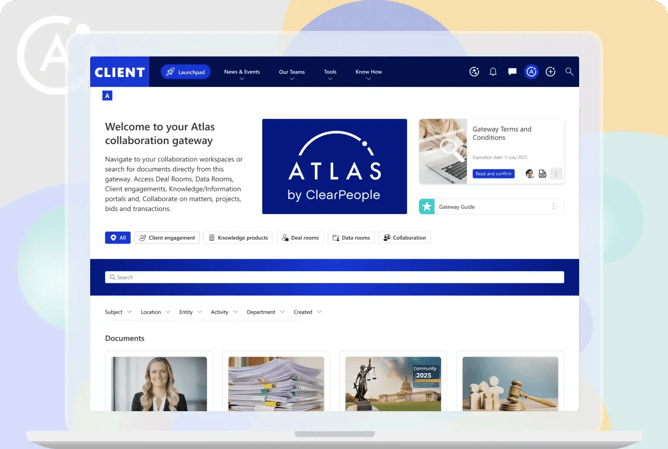
Client portals for modern firms
Unlike traditional extranet solutions, AtlasFuse automatically captures and classifies knowledge, ensuring every client interaction benefits from your firm’s authoritative expertise.
With advanced security, an AI knowledge assistant, and knowledge capabilities, AtlasFuse delivers instant value to your clients, directly within familiar tools like Microsoft SharePoint and Teams.
Client portal benefits at a glance
Enhances client satisfaction
Competitive differentiation
A modern, forward-thinking experience positions your firm as truly client-centric.
Streamlined operational efficiency
Automates routine yet essential tasks, freeing your teams to focus on higher-value work.
Secure and compliant interactions
Consistent governance and role-based access controls make compliance easier to maintain.
Creates a single source of truth
Create a single source of truth for documents, knowledge, search, AI and collaboration.
Optimizes your M365 investment
Scale sustainably by extending Microsoft 365 for secure collaboration spaces.
Saves time and reduces costs
With repeatable templates and self-service setup, providing a more cost-effective alternative to standalone client portal solutions.
AI-ready without losing control
Improve findability and responsiveness with AI-assisted answers grounder in governed content.
/Client%20Case%20Studies/Testimonials/Anonymous%20Testimonial%20logo%20cyan.webp?width=576&height=537&name=Anonymous%20Testimonial%20logo%20cyan.webp)
International law firm takes client service to next level with AtlasFuse
The project involved replacing the existing platform for external client collaboration and to support the transition to and migration of client-facing sites to the new solution. This had to be done at pace to meet specific compliance deadlines.
Essential components of client portals
Engaging collaboration
Intuitive shared workspaces where clients and lawyers can chat, meet, share files, and collaborate securely.
Knowledge integration
AtlasFuse automatically collates and surfaces relevant information from Microsoft 365 and connected systems.
Secure document sharing
Peace of mind with Microsoft-grade security, governance by design, and role-based access controls.
AI-enabled
Enable clients and external users to access AI-powered answers from approved knowledge sources, with permission-based access controls.
Self-service setup
Allow teams to create client portals, deal rooms and collaboration spaces with confidence using approved templates, provisioning rules and governance controls.
Dashboard
Monitor usage, adoption and engagement across internal and external users, giving firms insight into how portals and collaboration spaces are being used.
Search
Users can easily find authorized documents, updates, knowledge and resources quickly through secure, permission-aware search.
Matter and project extranets
Create dedicated collaboration spaces for specific matters, projects or client relationships, enabling legal teams and external users to work together efficiently.
Request personalized demo
This site is protected by reCAPTCHA and the Google Privacy Policy and Terms of Service apply.
FAQs
What is a client portal?
A client portal is a secure digital workspace that enables organizations to collaborate with clients, share documents, provide updates, and deliver trusted information in a controlled environment. AtlasFuse client portals combine secure collaboration, governed document sharing, and AI-assisted answers, all within Microsoft 365.
How does AtlasFuse improve client collaboration?
AtlasFuse improves client collaboration by giving clients secure access to documents, updates, knowledge, and expertise through a single workspace. This helps clients find trusted information faster while reducing the time internal teams spend searching for, recreating, or explaining content.
What makes AtlasFuse different from traditional client portals?
Unlike traditional client portals that focus primarily on document sharing, AtlasFuse combines client collaboration, knowledge management, and AI. AtlasFuse automatically captures and classifies knowledge, enabling clients to access not only files but also the expertise and information behind them.
Is AtlasFuse built for Microsoft 365?
Yes. AtlasFuse is built natively on Microsoft 365, enabling organizations to create client portals using their existing Microsoft 365 investment. This allows businesses to leverage familiar tools, security controls, governance capabilities, and collaboration features without introducing another disconnected platform.
How does AtlasFuse keep client information secure?
AtlasFuse provides secure workspaces, governed document sharing, role-based access controls, permissions management, and compliance capabilities within Microsoft 365. External users only see the information they are authorized to access, helping organizations maintain security and governance standards.
Can clients use AI to find information in AtlasFuse?
Yes. AtlasFuse includes an AI knowledge assistant that enables users to ask questions in natural language and receive answers based on trusted organizational knowledge. This helps clients find relevant information quickly while ensuring responses are grounded in approved content and existing permissions.
What business benefits do AtlasFuse client portals deliver?
AtlasFuse client portals help organizations improve client satisfaction, increase operational efficiency, strengthen compliance, and deliver a more modern digital experience. By simplifying access to information and expertise, Atlas helps teams spend less time managing requests and more time delivering value.
What are the benefits of a Microsoft 365 client portal?
A Microsoft 365 client portal enables organizations to extend their existing Microsoft investment while providing secure external collaboration. With AtlasFuse, businesses can leverage Microsoft 365 security, governance, search, and collaboration capabilities while delivering a seamless client experience through a dedicated portal.
What is the difference between a client portal and an extranet?
A client portal is a type of extranet designed specifically to support interactions between an organization and its clients. AtlasFuse Extranet goes beyond traditional extranets by combining secure collaboration, knowledge management, AI-powered answers, and Microsoft 365 integration in a single platform.
How do client portals improve the client experience?
Client portals improve the client experience by providing a single, secure destination where clients can access documents, updates, knowledge, and expertise whenever they need it. AtlasFuse enhances this experience further with AI-assisted answers and personalized access to relevant information, helping clients find what they need quickly and independently.